Understanding Smart Glasses Specifications A Beginner's Guide
Demystify smart glasses specifications with our easy-to-understand guide for beginners.
Demystify smart glasses specifications with our easy-to-understand guide for beginners.
Understanding Smart Glasses Specifications A Beginners Guide
Decoding Smart Glasses Specs What You Need to Know
So, you're diving into the exciting world of smart glasses, huh? That's awesome! But let's be real, looking at all those technical specifications can feel like trying to read a foreign language. Megapixels, fields of view, refresh rates – it's enough to make your head spin. Don't worry, you're not alone. This guide is here to break down the most important smart glasses specifications into plain English, helping you understand what they mean for your experience and how to choose the right pair for you. We'll cover everything from display tech to battery life, and even throw in some real-world examples to make it super clear. By the end of this, you'll be talking smart glasses tech like a pro!
Display Technology and Visuals Understanding Your Smart Glasses Screen
When it comes to smart glasses, the display is arguably the most crucial component. It's how you see all that augmented reality goodness or your notifications. There are a few key terms you'll encounter here:
Field of View FOV The Window to Your Digital World
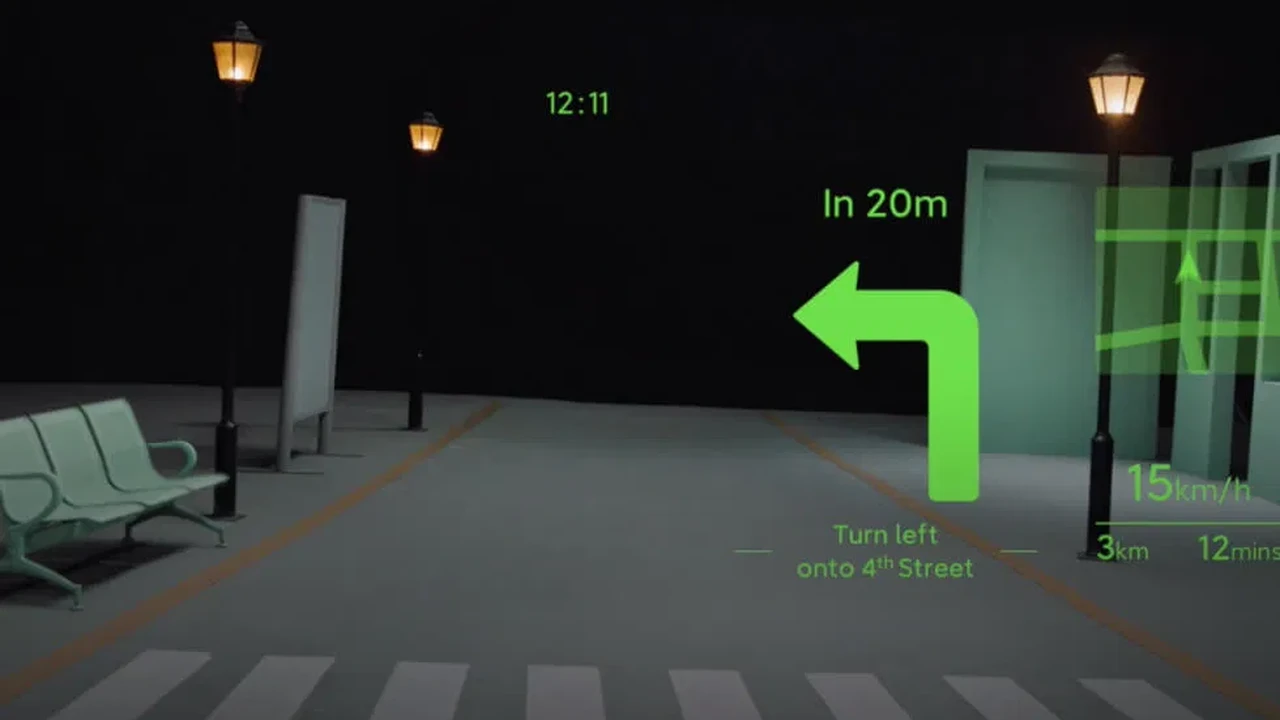
Think of the Field of View (FOV) as the size of the screen you're looking at. It's measured in degrees. A larger FOV means a wider, more immersive digital image overlaid onto your real world. For example, if you're looking at navigation directions, a larger FOV means the arrows and map might appear bigger and more prominent in your vision. For AR applications, a wider FOV makes the digital objects feel more integrated into your environment. Some smart glasses, like the Nreal Air, boast a 46-degree FOV, which is quite good for consumer-grade AR. Others, especially enterprise-focused devices like the Microsoft HoloLens 2, can have even larger FOVs (around 43 degrees horizontal and 29 degrees vertical, which translates to a much larger perceived area) to accommodate complex industrial applications. For casual use, a smaller FOV might be perfectly acceptable, but for immersive gaming or detailed work, you'll want something on the higher end.
Resolution Clarity and Sharpness in Smart Glasses Displays
Just like your TV or smartphone, resolution in smart glasses refers to the number of pixels that make up the image. Higher resolution means a sharper, clearer picture. You'll often see resolutions like 720p (HD) or 1080p (Full HD) per eye. For instance, the Ray-Ban Stories, primarily for capturing photos and videos, don't emphasize a high-resolution display for the user, as their primary function isn't AR overlay. However, devices like the Nreal Air offer a 1920x1080 resolution per eye, providing a crisp viewing experience for media consumption and AR. When comparing, remember that even a seemingly lower resolution can look good if the FOV is small, as the pixels are packed more densely. But generally, more pixels mean more detail and less 'screen door effect' (where you can see the individual pixels).
Brightness and Contrast Visibility in Different Lighting Conditions
Brightness, measured in nits, determines how well you can see the display in various lighting conditions. If you plan to use your smart glasses outdoors, especially in bright sunlight, you'll want a higher nit count to ensure the digital overlay is clearly visible and not washed out. Contrast refers to the difference between the brightest whites and darkest blacks. Good contrast makes images pop and text easier to read. Some smart glasses automatically adjust brightness based on ambient light, which is a handy feature.
Refresh Rate Smoothness of Motion in Smart Glasses
Measured in Hertz (Hz), the refresh rate indicates how many times the image on the display is updated per second. A higher refresh rate (e.g., 90Hz or 120Hz) results in smoother motion, which is particularly important for fast-paced AR applications, gaming, or when interacting with dynamic content. A lower refresh rate can lead to motion blur or a less fluid experience. For simple notifications or static information, a lower refresh rate might be fine, but for anything interactive, aim for 90Hz or above if possible.
Processing Power and Performance The Brains of Your Smart Glasses
Just like any computer, smart glasses need a 'brain' to run their operations. This is where the processor, RAM, and storage come in.
Processor CPU The Engine Driving Smart Glasses
The Central Processing Unit (CPU) is the main chip that handles all the calculations and instructions. You'll often see names like Qualcomm Snapdragon XR platforms. These are specifically designed for extended reality (XR) devices, offering optimized performance for AR and VR. A more powerful processor means faster app loading, smoother AR experiences, and the ability to handle more complex tasks without lag. For example, the Google Glass Enterprise Edition 2 uses a Qualcomm Snapdragon XR1, which is designed for on-device AI and efficient processing for industrial use cases.
RAM Random Access Memory Multitasking Capabilities
RAM is like the short-term memory of your smart glasses. The more RAM it has, the more applications and processes it can handle simultaneously without slowing down. For basic notification-based smart glasses, 2GB or 4GB might suffice. However, for AR glasses running complex applications, 6GB or 8GB (or even more for enterprise devices) will provide a much smoother multitasking experience. Think of it this way: if you're running multiple AR apps or streaming high-quality content, more RAM is your friend.
Storage Internal Memory Where Your Data Lives
Storage refers to the internal memory where your operating system, apps, photos, and videos are stored. Common sizes range from 16GB to 128GB or even more. If you plan to capture a lot of photos and videos (like with Ray-Ban Stories, which typically come with 4GB of flash storage for media), or download many apps, you'll want more storage. Some smart glasses might offer cloud integration, reducing the need for massive onboard storage, but local storage is always faster for immediate access.
Camera Specifications Capturing Your World with Smart Glasses
Many smart glasses come equipped with cameras, allowing you to capture photos and videos from a first-person perspective. This is a major selling point for devices like the Ray-Ban Stories.
Megapixels MP Image Quality and Detail
Megapixels determine the resolution of the photos your smart glasses can take. More megapixels generally mean more detail and larger image files. For example, the Ray-Ban Stories feature dual 5MP cameras, which are decent for casual photos and short videos shared on social media. For professional use or high-quality content creation, you might look for smart glasses with higher megapixel counts, though these are less common in consumer models currently.
Video Resolution and Frame Rate Smoothness of Recordings
Similar to photos, video resolution (e.g., 1080p, 4K) and frame rate (e.g., 30fps, 60fps) are important. Higher resolution means clearer video, and a higher frame rate means smoother, more fluid motion. If you're recording action-packed moments, 60fps will look much better than 30fps. Some smart glasses might even offer image stabilization to reduce shakiness in your recordings.
Audio Features Sound and Communication in Smart Glasses
Audio is a critical part of the smart glasses experience, whether it's for calls, music, or interacting with voice assistants.
Speakers and Microphones Clear Sound and Voice Commands
Most smart glasses use open-ear audio, meaning the sound is directed towards your ears but doesn't block out ambient noise. This is great for situational awareness. Some, like the Amazon Echo Frames, use micro-speakers that direct sound to your ears, while others might use bone conduction technology. Look for multiple microphones, often with noise cancellation, to ensure clear voice commands and calls, even in noisy environments. The quality of these components directly impacts your ability to make calls, listen to music, and use voice assistants effectively.
Audio Codecs and Bluetooth Version Connectivity and Quality
Audio codecs (like aptX, AAC, SBC) determine the quality of audio transmission over Bluetooth. Higher-quality codecs offer better sound fidelity. The Bluetooth version (e.g., Bluetooth 5.0, 5.2) impacts connectivity stability, range, and power efficiency. Newer Bluetooth versions generally offer a more reliable and efficient connection to your smartphone or other devices.
Connectivity Options Staying Connected with Smart Glasses
How your smart glasses connect to the outside world is crucial for their functionality.
Bluetooth Wireless Connection to Your Phone
Bluetooth is the most common way smart glasses connect to your smartphone. This allows them to receive notifications, stream audio, and access your phone's internet connection. Ensure compatibility with your phone's Bluetooth version for optimal performance.
Wi-Fi Direct Internet Access and Updates
Some smart glasses, especially more advanced AR models, might have Wi-Fi capabilities. This allows them to connect directly to the internet for updates, app downloads, or cloud services without needing to tether to your phone. This is more common in enterprise-grade smart glasses or standalone AR devices.
GPS and Location Tracking Navigation and Contextual Awareness
GPS allows your smart glasses to know your location, which is essential for navigation, location-based AR experiences, and contextual notifications. If you plan to use your smart glasses for outdoor activities or navigation, ensure they have robust GPS capabilities.
Battery Life and Charging Powering Your Smart Glasses
Nobody wants their smart glasses to die in the middle of the day. Battery life is a practical consideration.
Battery Capacity and Usage Time How Long Will They Last
Battery capacity is usually measured in milliampere-hours (mAh). However, the actual usage time depends heavily on how you use the glasses. Streaming music, using AR apps, or recording video will drain the battery faster than simply receiving notifications. Manufacturers usually provide estimated usage times for different scenarios. For example, Ray-Ban Stories might offer a few hours of continuous recording, while simpler audio glasses could last a full day of intermittent use.
Charging Time and Methods Quick Power Ups
Consider how long it takes to fully charge the smart glasses and the charging method (e.g., USB-C, proprietary charging case). Some smart glasses come with charging cases that can provide multiple charges on the go, extending their overall battery life significantly. Fast charging capabilities are also a plus if you're often on the move.
Sensors and Tracking Understanding Your Environment
Sensors are what allow smart glasses to understand their surroundings and your movements.
Accelerometers and Gyroscopes Motion Tracking and Orientation
These sensors detect motion, orientation, and rotation. They are crucial for tracking head movements, enabling intuitive navigation within AR environments, and stabilizing images. They help the smart glasses understand where you're looking and how you're moving.
Magnetometers Digital Compass for Direction
A magnetometer acts as a digital compass, helping the smart glasses determine your orientation relative to magnetic north. This is important for accurate navigation and positioning in AR applications.
Proximity Sensors and Ambient Light Sensors Automatic Adjustments
Proximity sensors can detect when the glasses are on your face, allowing for automatic power saving or display activation. Ambient light sensors adjust the display brightness based on the surrounding light conditions, optimizing visibility and battery life.
Design and Ergonomics Comfort and Style for Smart Glasses
Beyond the tech specs, how smart glasses look and feel is incredibly important, especially since you'll be wearing them on your face.
Weight and Balance Comfort for Extended Wear
Lighter glasses are generally more comfortable for extended wear. The distribution of weight is also important; well-balanced glasses feel less cumbersome. Some smart glasses, like the Amazon Echo Frames, are designed to look and feel like regular glasses, prioritizing lightweight comfort.
Materials and Durability Build Quality for Longevity
Consider the materials used (e.g., plastic, metal, carbon fiber) and their durability. Are they splash-resistant? Do they feel robust enough for your intended use? If you're active, you'll want something more durable.
Style and Aesthetics Fashion Meets Function
Let's be honest, smart glasses are a fashion statement. Do they blend in with your personal style? Are they discreet, or do they stand out? Brands like Ray-Ban have focused heavily on making their smart glasses look like traditional eyewear, which is a big draw for many consumers.
Software and Ecosystem The User Experience of Smart Glasses
The hardware is only half the story; the software and the ecosystem of apps and services are what bring smart glasses to life.
Operating System and User Interface Ease of Use
What operating system do the smart glasses run on? Is the user interface intuitive and easy to navigate? Some might run a custom OS, while others might be based on Android. A good UI makes a huge difference in daily usability.
App Ecosystem and Compatibility What Can You Do
What apps are available for the smart glasses? Are they compatible with your existing smartphone apps? A rich app ecosystem expands the functionality of your smart glasses significantly. For example, some smart glasses integrate seamlessly with popular fitness apps, navigation apps, or communication platforms.
Voice Assistants and Controls Hands-Free Interaction
Most smart glasses rely heavily on voice commands for hands-free interaction. How responsive and accurate is the built-in voice assistant (e.g., Alexa, Google Assistant, or a proprietary one)? Are there physical buttons or touch controls as well?
Specific Product Recommendations and Comparisons
Let's look at some popular smart glasses and how their specs stack up, keeping in mind different use cases and price points.
Ray-Ban Stories A Blend of Style and Capture
* Key Specs: Dual 5MP cameras, open-ear speakers, 4GB storage, Qualcomm Snapdragon processor (specific model not widely publicized but optimized for media capture), Bluetooth 5.0. No display for AR.
* Use Case: Casual photo/video capture, hands-free calls, music listening. Perfect for social media enthusiasts and those who prioritize style.
* Comparison: Unlike true AR glasses, Ray-Ban Stories don't overlay digital information onto your view. They are more about discreetly capturing moments and audio. Their strength lies in their iconic design and ease of use for media capture.
* Price: Starting around $299 USD.
Amazon Echo Frames Audio First Smart Glasses
* Key Specs: Open-ear audio, multiple microphones for Alexa, no camera, no display, Bluetooth 5.0. Lightweight design.
* Use Case: Hands-free access to Alexa, calls, music, podcasts. Ideal for those who want smart assistant functionality and audio without a visual display.
* Comparison: Similar to Ray-Ban Stories in lacking a visual display, but focused purely on audio and Alexa integration. They are very discreet and feel like regular glasses.
* Price: Around $269.99 USD.
Nreal Air Immersive AR for Media and Gaming
* Key Specs: Micro-OLED display (1920x1080 per eye), 46-degree FOV, 90Hz refresh rate, integrated speakers, no camera for capture (but has tracking cameras), connects via USB-C to compatible phones/devices.
* Use Case: Media consumption (watching movies on a 'giant screen'), cloud gaming, light AR applications. Great for travelers or those who want a portable big screen experience.
* Comparison: These are true AR glasses, offering a visual overlay. Their strength is the immersive display for media and gaming, making your phone screen feel tiny. They are tethered to a phone, unlike standalone AR headsets.
* Price: Around $379 USD.
Google Glass Enterprise Edition 2 Industrial AR Workhorse
* Key Specs: Qualcomm Snapdragon XR1, 3GB RAM, 32GB storage, 8MP camera, optical display module (small FOV), Wi-Fi, Bluetooth.
* Use Case: Industrial applications, remote assistance, training, logistics. Designed for hands-on workers who need information overlaid in their field of view.
* Comparison: This is a professional-grade device, not for consumers. Its focus is on productivity and efficiency in specific work environments. The display is smaller and less immersive than consumer AR glasses but highly functional for its purpose.
* Price: Typically sold to businesses, pricing varies but can be several thousand dollars per unit.
Vuzix Blade 2 Enterprise and Prosumer AR
* Key Specs: Android OS, Snapdragon XR1, 8MP camera, waveguide display, Wi-Fi, Bluetooth, integrated speakers.
* Use Case: Similar to Google Glass EE2 but also targets 'prosumers' for specific professional tasks, remote support, and data visualization.
* Comparison: Offers a more robust feature set than basic audio glasses and is more accessible than high-end industrial AR headsets. It bridges the gap between consumer and enterprise.
* Price: Around $1,299 USD.
Making Your Smart Glasses Choice Matching Specs to Your Needs
Now that you've got a handle on all these specifications, how do you put it all together to make an informed decision? It really boils down to your primary use case.
For Casual Use and Social Sharing Prioritizing Style and Capture
If you're mainly interested in hands-free photo/video capture, listening to music, and taking calls while looking stylish, you'll want to focus on:
* Design and Aesthetics: Do they look like regular glasses? Are they comfortable?
* Camera Specs: Megapixels and video resolution for your content needs.
* Audio Quality: Clear speakers and microphones for calls and music.
* Battery Life: Enough to get you through your day of casual use.
Products like the Ray-Ban Stories or Amazon Echo Frames fit this category perfectly.
For Immersive Media and Gaming Focusing on Visuals
If your goal is to watch movies on a 'big screen' or play cloud games with an immersive visual experience, then prioritize:
* Display Technology: High resolution, good FOV, and a high refresh rate are key.
* Connectivity: Ensure compatibility with your smartphone or gaming device.
* Weight and Comfort: For extended viewing sessions.
Nreal Air is a prime example of smart glasses designed for this purpose.
For Productivity and Professional Use Enterprise-Grade Features
If you're looking for smart glasses for work, remote assistance, or industrial applications, your focus shifts to:
* Processing Power and RAM: To handle complex applications.
* Durability and Ruggedness: For demanding environments.
* Specific Software Integrations: Compatibility with enterprise software.
* Camera and Display: For clear information overlay and remote collaboration.
Google Glass Enterprise Edition 2 and Vuzix Blade 2 are built for these demanding scenarios.
The Evolving Landscape of Smart Glasses What's Next
The world of smart glasses is still relatively young, but it's evolving at a rapid pace. We're seeing continuous improvements in display technology, battery efficiency, and processing power. As these devices become more powerful and discreet, their integration into our daily lives will only deepen. Understanding these specifications now will give you a solid foundation to navigate the exciting innovations yet to come. So go ahead, explore, and find the smart glasses that are just right for you!
:max_bytes(150000):strip_icc()/277019-baked-pork-chops-with-cream-of-mushroom-soup-DDMFS-beauty-4x3-BG-7505-5762b731cf30447d9cbbbbbf387beafa.jpg)